
Add decision points to your content: let readers choose their path, segment themselves, and convert at higher rates. No guesswork required!
Here’s something that bugs me about most popups: you’re guessing.
Someone lands on your site. You have no idea who they are. Beginner? Expert? Ready to buy? Just poking around? No clue. So you show them a generic popup and hope it lands.
Sometimes it does. Mostly it doesn’t.
What if you just… asked them?
Adding a “decision point” to your popup (a simple question before you capture information) helps you ensure your message lands.
The Problem with One-Size-Fits-All Popups
I run into this constantly. Someone’s got one lead magnet, one popup, and they’re showing it to literally every visitor. “Download my free guide!” Okay, but… a guide about what? For who?
The visitor has to figure out if it’s even relevant to them. Most won’t bother. They’ll close it and move on.
Think about the math here. If your popup actually speaks to maybe 30% of your visitors, you’re basically ignoring the other 70%. Even if that 30% converts great, that’s a lot of people you’re not reaching.
The obvious fix is different popups on different pages. Yes, do that! Page-specific targeting helps.
But even on one page, your visitors aren’t the same. Someone reading a post about “how to start a podcast” could be:
- A total beginner who’s never hit record
- Someone who’s been podcasting for a year and wants to grow
- A business owner trying to figure out if podcasting is even worth it
Same post, totally different situations. One lead magnet isn’t going to work for all three.
So you could guess which type is most common… or you could just ask.
What Reader Decision Points Actually Are

Here’s how it works: Instead of showing a popup that immediately asks for an email, you show a question first.
Something like: “Which best describes you?”
- I’m just getting started
- I’ve been at this a while
They click one. THEN they see an opt-in that actually matches their answer.
Beginner clicks? They get your “Start Here” guide. The experienced person gets your advanced stuff.
That first screen has no email field, just buttons. Super low friction – they’re just answering a question.
It’s like when a good salesperson asks “What brings you in today?” instead of launching into a hard sell. You ask first, then you help.
Why Asking First Changes Everything
A few things happen when you do this:
People actually engage with the popup. Clicking a button feels easier than filling out a form. You’re not asking for much yet. Just “tell me what you need.” That tiny shift gets more people interacting instead of immediately closing.
The offer actually fits. After they’ve told you what they need, you show them exactly that. It’s not “here’s my generic thing, hope you like it.” It’s “you said you’re struggling with X, here’s something specifically for X.” That feels different. People notice when something’s actually relevant to them.
You’re sorting people as they come in. Some of those choices can tell you who’s serious and who’s just browsing. “I’m ready to invest in solving this” vs. “I’m just curious” is useful information. The curious folks still get something valuable, but you know who to follow up with first.
It doesn’t feel like an interruption. Most popups feel like something you have to deal with before you can get back to reading. This feels more like a helpful question. “What are you looking for?” is different from “GIVE ME YOUR EMAIL.”
Examples That Actually Work
Example 1: Two different audiences
Say you run a marketing blog. Your readers are split: some are freelancers, some run agencies. Similar topics, but different scale of problems.
Your decision point: “Which best describes you?”
- I’m a freelancer or solo consultant
- I run an agency or team
Freelancer clicks → they see an opt-in for “The Freelancer’s Guide to Landing Bigger Clients”
Agency clicks → they see “Scaling Your Agency: Systems That Actually Work”
Same trigger, two different lead magnets. Each group gets something built for them.
Example 2: Different problems
A productivity site. Visitors could be struggling with totally different things.
Decision point: “What’s your biggest challenge?”
- I can’t stay focused
- I procrastinate on the important stuff
Each answer leads somewhere different: focus guide, procrastination checklist.
Example 3: Where are they in the buying process?
A B2B software company. Some visitors are just researching. Some are comparing options. Some are ready to buy.
Decision point: “Where are you in your search?”
- Comparing a few solutions
- Ready to make a decision soon
Comparers get a comparison chart (that makes you look good, naturally). Ready-to-buy folks get a demo offer.
Same traffic, but now you’re treating each person appropriately for where they’re at.
Example 4: Different goals
A course creator with one flagship program that helps people at different stages.
Decision point: “What’s your main goal?”
- Replace my full-time income
- Scale past six figures
Each answer leads to a relevant case study.
Setting Up Decision Points in PopupAlly
In PopupAlly, we’ve got a decision point template all set up for you to customize. Here’s how to set yours up:
Step 1: Select the “Simple Choice” Template
From your WordPress dashboard, go to PopupAlly Pro > Style Settings, and create or edit a popup.
Then choose Simple Choice from the dropdown menu under Popup Template.
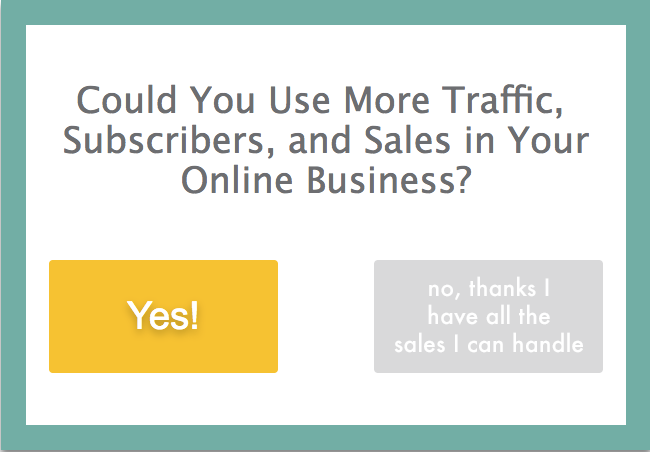
Step 2: Customize Your Popup Window
Change the background color or image, font color, edit the size, the margin etc.
Type in your question, then click on each of the buttons to edit them.
Step 3: Decide on your choice destinations
Each answer needs somewhere to go. With PopupAlly you can choose whether to send them to a URL on your site or to send them to another popup that matches what they’ve clicked.
When editing each button you’ll see the option to either enter a URL or “show another popup instead”. If you want to display another popup, simply enter the popup id in the box below – which brings us to…
Step 4: Build the follow-up opt-ins
If you decide to show another popup, make sure to create them too. Maybe it’s an opt-in, a coupon, or maybe you want to get even more specific with a follow up choice decision popup!
Step 5: Pick your trigger.
When should the decision point show up? Same options as any popup: after they scroll a certain amount, after some time on page, when they’re about to leave.
I like scroll-triggered for these. Someone’s been reading, they’re engaged, and now you’re asking “what brought you here?” That feels natural.
Choose your trigger in the Display Settings tab of PopupAlly Pro.
When This Makes Sense (and When It Doesn’t)
Good situations for decision points:
- Your audience has clearly different segments
- You’ve got multiple lead magnets (or you’re willing to make them)
- Your one generic popup isn’t converting well
- You want to learn more about who’s actually visiting
- Longer sales cycles where qualifying early matters
Probably skip it if:
- Your audience is genuinely all the same (rare)
- You only have one lead magnet and aren’t making more
- Traffic is really low and segmenting doesn’t make sense yet
- The page is already super specific so visitors are pre-filtered
My advice: start simple. One popup, one high-traffic page, two choices. See what happens. Expand from there.
The Point of All This
Here’s what it comes down to for me.
Most popups are a broadcast. Same message, everyone, fingers crossed. Easy to set up, but lazy.
People respond to relevance. They respond when something feels like it’s actually for them rather than for everyone.
Asking a question first is one way to get there. You’re starting a conversation instead of just talking at people. Small change in how it works. Big change in how it feels.
And yeah, it tends to convert better. Relevant beats generic. I’ve seen it over and over.
Give Your Visitors a Choice
Your visitors aren’t all the same. Stop treating them like they are.
Reader Decision Points let you ask what someone needs, then give them exactly that. Lower friction up front. Better fit when you ask for the email. Useful information for everything that comes after.
Ready to let visitors choose their own path?
If you liked this article, follow us on Twitter, Facebook, Pinterest, and LinkedIn. And don’t forget to subscribe to our newsletter!
Have you tried asking visitors what they want before pitching them? How’d it go? Let me know in the comments.
